Sandi Bancod
Work Side Quests About Resume

Sandi Bancod. UI/UX Designer.

What I do

Crafting intuitive experiences, where people-first thinking meets purposeful design.

Currently

UI/UX Designer at CEC Entertainment — designing digital experiences from web to in-store ordering.

I'd love to hear from you!

Open to new opportunities and collaborations.

Side Quests.

Passion projects, creative experiments, and work that lives outside the usual brief. A lot of this explores AI as a tool for creativity and quick execution, where learned prompt generation skill makes all the difference.

Space Chuck E.

AI Character Design · CEC

Space Chuck E.

Chuck E. reimagined as an astronaut for Adventure World, developed using AI prompt generation while staying true to CEC brand guidelines.

Space Helen

AI Character Design · CEC

Space Helen

Helen Henny in a space suit, part of the Adventure World character lineup, created with precision AI prompting to match CEC's visual identity.

Bella the Bunny

AI Character Design · CEC

Racecar Bella

Bella is an existing Chuck E. Cheese character reimagined as a racecar driver for the first Adventure World location, brought to life using AI prompt generation aligned with CEC brand guidelines.

CEC x Adidas concept

AI Product Design · Concept

CEC × Adidas Gazelle

A product design concept exploring what a Chuck E. Cheese x Adidas collaboration could look like, created using AI design tools and prompt engineering.

Hey there, I'm Sandi.

Sandi Sandi

Before my journey into UX/UI design, I studied leadership and biblical studies with a focus on music in ministry. Creativity has always been a core part of my life. Whether through music, art, or storytelling — my overarching mission to serve others has remained constant.

I bring this same "people-first" mindset with what I do today by designing intuitive, innovative, and accessible experiences that help people feel understood and supported.

Resume ↗

Outside of design.

You'll find me at

🎵 Live music ☕ Coffee shops 🩰 Barre classes ✈️ Traveling 🤍 Time with friends

What I'm listening to

Thrill

Sydney Ross Mitchell

Breathe

Malcolm Todd

Justin

Bieber

I'd love to hear from you!

Open to new opportunities and collaborations.

← Back to Work
Mobile App AR Case Study

ClimbOn.

An AR climbing app for outdoor climbers — making route identification faster, safer, and less stressful.

Role

UX Researcher · UI Designer · Project Manager

Timeline

July – August 2023

Tools

Figma · Zoom

ClimbOn

ClimbOn is a mobile AR climbing app designed to enhance the outdoor climbing experience by making route identification faster and easier. Using augmented reality, climbers can scan rock formations to locate beta in real time — reducing stress, improving safety, and allowing them to stay focused on the climb.

Climbers were guessing their way up the wall.

Through research, we discovered outdoor climbers struggle to identify routes on natural rock walls. This led to unnecessary guesswork, increased mental strain, and reduced safety and enjoyment. Physical guidebooks — the only real resource — were out of print and selling for up to $135.

60% prefer outdoor over indoor climbing
85% interested in an AR climbing app
70% rely on a guidebook to find routes
01 Understand 02 Define 03 Design 04 Reflect

Getting to know the climbing world.

We conducted a survey with 41 responses and 5 semi-structured interviews to validate our app concept. As non-climbers, this phase taught us the culture — terms like "beta," "send," and "project" became part of our vocabulary.

We also went on a field trip to an outdoor climbing site. Experiencing firsthand how hard it was to identify routes gave us real empathy for our users.

"There's so much liberty with climbing… but the hardest part is not having enough time." — Sam N.

Affinity Diagram

Sorted and grouped feedback from surveys and interviews to find patterns.

Feature Prioritization

Mapped which features were most valued by climbers based on research.

Competitive Analysis

Reviewed Mountain Project, KAYA, and physical guidebooks to find the gap.

Affinity diagram, feature prioritization, storyboard

Clarifying who we were designing for.

Product Users: Outdoor sport climbers and boulderers, ages 20–40, who regularly climb in unfamiliar areas.

Problem Statement

Outdoor climbers have difficulty finding routes on a rock wall and waste their time before enjoying the climb.

Hypothesis

If we create an AR tool to help climbers identify routes, they'll have a better and less stressful climbing experience.

Value

ClimbOn pairs climbers with appropriate routes — saving time, energy, and reducing risk of injury.

Key pain points identified:

  • Climbers spend excessive time planning outdoor routes
  • Identifying routes in person is overwhelming and stressful
  • Anxiety around injury when attempting unfamiliar climbs

From rough sketches to a "groundbreaking" prototype.

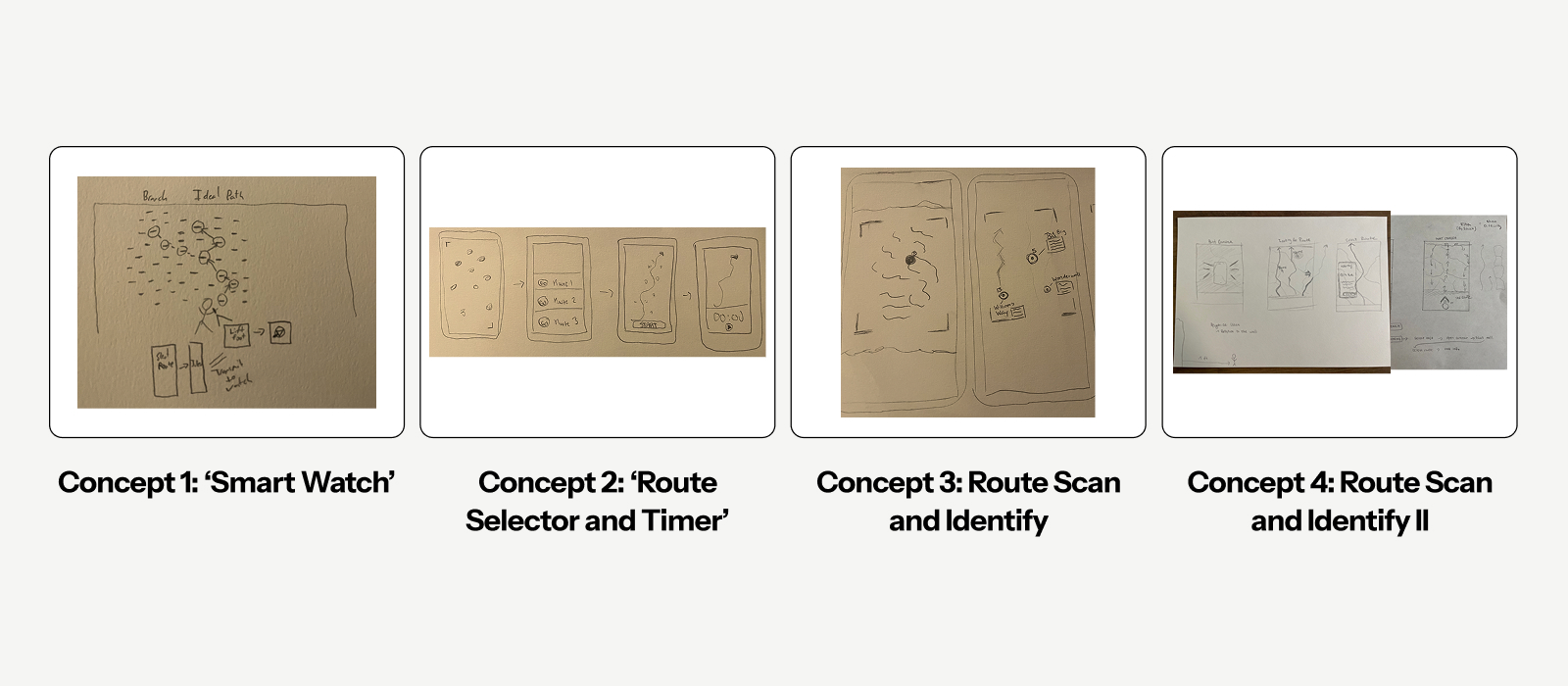
We explored four concepts — from a smartwatch integration to AR route scanning — and narrowed down to the most viable solution through user testing at each fidelity level.

Concept sketches

Homescreen Iteration

Screens evolved through lo-fi and mid-fi testing. The final homescreen simplified navigation to two primary actions: Near Me and Scan Rocks.

Homescreen iterations

Route Card Iteration

Early route cards included activity level indicators and hashtags — users found neither helpful since they'd already be at the site. We stripped these and focused on what climbers actually needed: hold types, ratings, and route description.

Route card iterations

A/B Test — Beta Toggle

Users were split on seeing route beta (hold labels) in the AR view. Some found it helpful; others considered it "cheating." Our solution: an optional toggle so climbers could choose their own experience.

Beta toggle A/B test

Four key flows, refined through testing.

01

Onboarding

Sign in, grant permissions, learn the core features.

02

Near Me

Search nearby rock formations, explore areas, decide where to go.

03

Scan Rocks

Use AR to locate routes, view beta, and read climber comments.

04

ClimbList

Save routes as projects, log sends, and track attempts.

01 — Onboarding

Onboarding flow

02 — Near Me & Routes

Routes flow

03 — Scan Rocks

Scan Rocks flow

04 — ClimbList

ClimbList flow

A digital guidebook in their hands.

We delivered an AR-powered experience that allows climbers to quickly scan rock formations, access real-time beta, and approach each ascent with greater safety, clarity, and confidence.

"This is a huge improvement over the book." — Ethan V.
"It's like a digital guidebook in my hand." — Parker B.
"This is groundbreaking!" — Sam N.

What we learned.

  • Initial interviews are invaluable when designing for a culture you're unfamiliar with.
  • Usability testing at every fidelity level consistently surfaced features worth refining or cutting.
  • Field testing gave us empathy we couldn't have gained from a screen alone.

Next Steps

  • A social component and mentorship feature for the climbing community
  • Integration with the Mountain Project API for real route data
  • Revisiting the smartwatch concept explored early in ideation
← Back to Work
Mobile App Social Case Study

Happenings.

A community-focused event planning app designed to make gathering with the people you love feel effortless again.

Role

UX Researcher · UI Designer

Timeline

March – April 2023

Tools

Figma

Happenings

Happenings is a community-focused app designed to simplify the process of planning and organizing gatherings. In a post-pandemic world where meaningful connections are more important than ever, Happenings streamlines the planning process — fostering a sense of belonging, connection, and community.

After the pandemic, gathering felt harder than it should.

One of the biggest challenges people faced post-pandemic was relearning how to connect. Relationships are a basic human necessity — and a lack of meaningful connection directly correlates to a lower quality of life. Yet planning a gathering remained overwhelming, fragmented, and stressful.

80% of respondents have hosted a small gathering
64% interested in food, mood & music pairings
97 adults surveyed across 10 questions
01 Discover 02 Define 03 Ideate 04 Design

We started with a wrong assumption.

Initially, we assumed a need for a drink-mixing app. But after surveying 97 adults and conducting 8 semi-structured interviews, a different unfulfilled need emerged — people didn't want better cocktails. They wanted better gatherings.

"There is less interest in mixing drinks at a party, and more interest in creating an environment where guests feel comfortable and happy."

Survey

97 adults (ages 21+), 10 questions on gatherings, community, and social habits.

Interviews

8 semi-structured interviews (ages 21–36) to drill down on specific feelings and viewpoints.

Competitor Analysis

Reviewed Partiful, Evite, Pinterest, Big Night, and Make Me a Cocktail to identify key gaps.

Affinity Map

Affinity map

Sketches

Sketches

What people actually needed.

Our user: The Hostess — a 27-year-old marketing manager in Austin who loves bringing friends together but struggles to make every gathering feel cohesive and fun for everyone.

Pain Points

Planning is difficult. Hosts want all guests to have a great time. Poor communication around attendance affects planning. Guests feel anxious about not connecting.

Hypothesis

If we make the planning aspect easy and enjoyable, people will feel more fulfilled and connected to those around them.

Necessities

Good ambiance (music, energy, atmosphere). Food and drinks for all guests. Themes that bring people together. Easy, frictionless planning.

User Persona — The Hostess

User persona

Two flows, one big insight.

We explored two approaches to the core planning experience and tested them head-to-head:

Wizard Flow

Step-by-step guided planning — structured, predictable, easy to follow. Users set size, theme, date, location, and invites in sequence.

Random Flow

AI-generated theme suggestions users swipe through — more playful and exploratory, but less control for the host.

Testing Results

6 out of 9 users preferred the Wizard Flow for its clarity — but loved the visual energy of the Random Flow's theme cards.

Wizard Flow — Choosing Parts

Wizard flow wireframes

Random Flow — Shifting Through

Random flow wireframes

The final experience.

The final design combines the structure of the Wizard Flow with the visual delight of the Random Flow's theme cards — giving hosts both clarity and creativity. The app walks users through size, theme selection, date, location, and invites in a seamless sequence.

I'm cooking... stay tuned for the updated design ✨

Making it happen.

Happenings removes the barriers to social interaction — encouraging people to engage more actively in their social lives, cultivating belonging and community in the post-pandemic era.

What's next.

Our research pointed to one clear next step — building the guest experience. The current app is host-focused, but guests need their own flow too.

  • Build a "Hybrid" workflow combining the structure of Wizard with the visuals of Random
  • Develop a full collaborative guest experience feature
  • Explore AI-assisted theme and activity suggestions based on group size and preferences
← Back to Work
Web Design Campaign Digital Experience

Chuck E. Cheese Web.

Seasonal campaign comps designed to support major marketing briefs, updating the site experience to drive coupon redemption and family engagement.

Role

UI/UX Designer

Company

CEC Entertainment

Type

In-House Campaign Design

Chuck E. Cheese

As part of a major campaign brief at CEC Entertainment, I designed seasonal web comps that updated the Chuck E. Cheese site experience to support coupon-driven campaigns. The work spanned multiple seasons — each requiring a fresh look while maintaining brand consistency and a family-first feel.

Drive families to the site. Make them stay.

Each seasonal campaign centered on a coupon offer that needed to be front and center — visually exciting for kids, clear and trustworthy for parents. The designs had to work across desktop and mobile, and align with the broader campaign creative.

Goal

Update the web experience to support seasonal coupon campaigns and drive in-store visits.

Audience

Families with young children, parents making decisions, kids driving excitement.

Approach

Bold seasonal visuals, clear coupon hierarchy, responsive layouts for desktop and mobile.

Designing within the brief.

While these pages followed a campaign brief, there were intentional UI/UX decisions behind each one.

Coupon First

The coupon offer needed to be the first thing guests saw. It's the primary call-to-action, the reason they landed on the page, so hierarchy was built around making it impossible to miss.

Upgrades as a Secondary CTA

Upgrade options were placed below the coupon in a color that stands out while staying within the campaign lockup palette, visible enough to drive consideration without competing with the primary offer.

Spring Break Family Deal.

The Spring Break comp centered on the $49.99 Ultimate Spring Break Family Deal, designed to feel energetic and kid-friendly while making the offer impossible to miss.

Desktop & Mobile Comp

Spring campaign comp

Summer vibes, same energy.

The Summer comp carried the same campaign structure into a new seasonal look, refreshed visuals, updated offer, and consistent layout patterns across breakpoints.

Desktop & Mobile Comp

Summer campaign comp
← Back to Work
Web Design Digital Experience

Kid Check Landing Page.

A landing page for Chuck E. Cheese's child safety program, designed to stand apart from the rest of the site and communicate safety, trust, and reliability to parents.

Role

UI/UX Designer

Company

CEC Entertainment

Type

Web Initiative

Kid Check is Chuck E. Cheese's patented child safety system, used at every location since 1994. The landing page needed to clearly explain the program, build confidence with parents, and feel distinctly different from the rest of the marketing site.

Safety needs a different kind of design.

Most of the Chuck E. Cheese site is high-energy and kid-focused. Kid Check needed to speak directly to parents in a way that felt calm, credible, and trustworthy, without feeling clinical or disconnected from the brand.

Stand Apart

The page needed to feel visually distinct from campaign pages, signaling a shift in tone from promotional to informational.

Communicate Safety

Parents needed to immediately understand how the system works and why it makes Chuck E. Cheese a safer environment for their kids.

Build Trust

The design had to convey reliability and credibility, giving parents confidence before they even walk through the door.

Safety first, always.

The final page leads with the Kid Check brand mark, clearly explains the five-step process, and uses a structured layout to walk parents through every safety measure in place. The design prioritizes clarity and reassurance at every scroll point.

Landing Page

Kid Check landing page